
How do I redeem my points for a reward?Updated 15 days ago
You can redeem your points in a few different areas to get a discount code for your next eligible order or subscription.
To redeem a discount code in the customer portal:
1. Log into your VG Insiders account
2. Click on Redeem Points in the customer portal
3. Select a reward and copy your code to apply it at checkout or on a subscription.
You can also access this via the Loyalty page by selecting Redeem Now.
To redeem a discount code at checkout
1. Log into your VG Insiders account
2. Click on your bag to start your check out
3. Use the drop-down menu in your bag to select your reward.
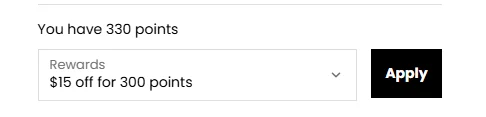
4. Select a reward and copy your code to apply it at checkout or on a subscription.
Important Note: You can access all redeemed codes via the Reward History tab on the Loyalty page.
Terms and Conditions
There is a minimum spend required to redeem your discount. See the table below for more information.
Points | Reward | Minimum Spend |
100 | £5 | £39 |
200 | £10 | £39 |
300 | £15 | £39 |
400 | £20 | £39 |
600 | £30 | £78 |
800 | £40 | £78 |
To apply a reward to a subscription, refer to the steps here.
Lost a reward? Click here.
For more support, reach out to our team on [email protected].