Redeem loyalty pointsUpdated 11 days ago
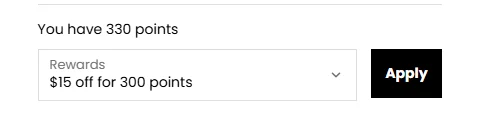
When you reach the online checkout, make sure you are logged into your VG Insiders account and click here to select your reward.
You can start redeeming your points once you have reached 100 points.
There is a minimum spend required to redeem your discount. See the table below for more information.
Points | Reward | Minimum Spend |
100 | £5 | £39 |
200 | £10 | £39 |
300 | £15 | £39 |
400 | £20 | £39 |
600 | £30 | £78 |
800 | £40 | £78 |
To redeem a discount code, please follow these steps:
1. Log into your VG Insiders account
2. Click on Redeem Points via the menu in the Customer Portal
3. Scroll down and select a reward. Copy your code to apply it at checkout or on a subscription.
To apply a reward to a subscription, refer to the steps here.
Alternatively, you can use the drop-down menu at check-out to redeem your points and apply it directly to your order!